




The Best Invoice2go Alternative in 2026: Why SMBs Are Switching to Agentic AI
If you’re a freelancer, consultant, or solo creator, you probably started with a simple invoicing app like Invoice2go. It did the basics: send an invoice, track a payment, log some expenses.
But in 2026, "basic" is starting to feel expensive not just in subscription fees, but in time. You’re still:
- Manually drafting invoices
- Copy-pasting line items from old projects and for expenses
- Jumping between reports to figure out your real tax balance
- Guessing if you’re actually profitable this month
That’s why so many freelancers are looking for the best Invoice2go alternative and landing on tools built around agentic AI like BillingNow, which doesn’t just store your data, it acts on it for you.
In this guide, we’ll break down:
- How Invoice2go works and where it falls short for modern freelancers
- What agentic AI actually means (in plain language)
- Why a Notion-style editor is a game-changer for invoices and quotes
- How all-in-one reporting (tax, expenses, quotes, invoices, payments) beats tab-hopping
- When it makes sense to switch—and what that migration looks like
Invoice2go in 2026: Still Good, But Not Great for Busy Managers
Invoice2go has been around for a while, and it still covers the essentials:
- Create invoices and send them via email
- Track basic payments
- Store clients and items
- Use simple templates
For many freelancers, though, the pain points today look like this:
- Too much manual workYou’re still typing descriptions, calculating totals, and updating due dates by hand.
- Rigid templatesYou can customize colors and logos, but not how you work. Capturing project notes, context, or detailed breakdowns is clunky.
- Fragmented reportingTaxes in one report, expenses in another, payments in a third. Getting a true "business dashboard" view is hard.
- No AI that actually acts"Smart" suggestions may exist, but they don’t truly do the job end-to-end. You still drive every step.
If that sounds familiar, you’re not alone and it’s exactly why many businesses are looking for a smarter alternative in 2026.
What Makes Agentic AI Different From Regular Automation?
Most invoicing tools offer basic automation:
- Auto-fill client details
- Recurring invoices
- Saved line items
Agentic AI goes further. Instead of waiting for you to click every button, it:
- Understands what you want to achieve (e.g., "invoice this client for last week’s work")
- Finds the relevant data (hours logged, past rates, usual terms)
- Proposes a complete, ready-to-send invoice
- Lets you review, tweak, and approve in seconds
- Ask for overdue invoices while driving the car and ask to send the reminder.
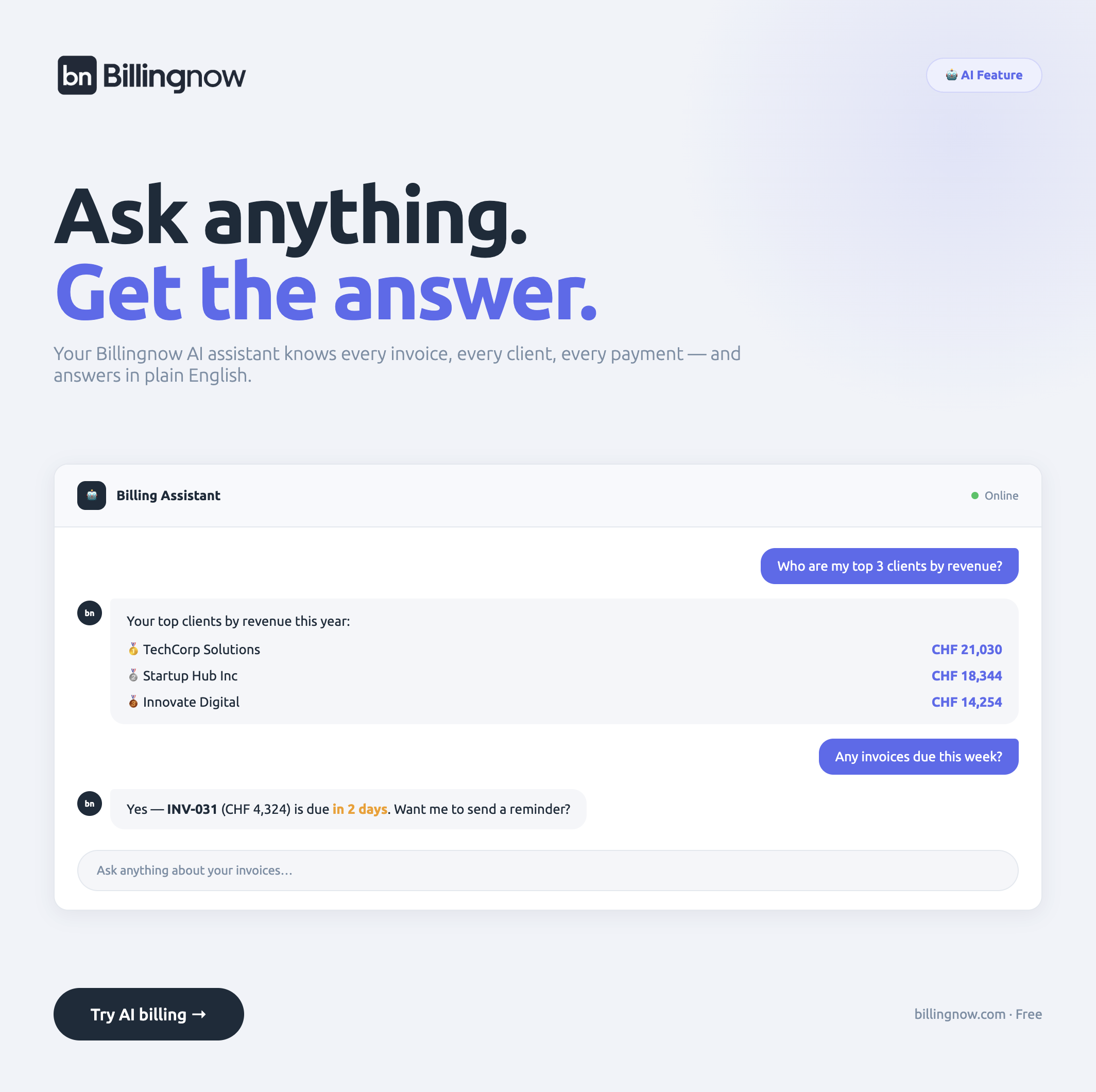
On platforms like BillingNow, the AI becomes your billing assistant:
- It remembers how you usually bill each client
- It suggests line items based on past projects
- It sets taxes, discounts, and due dates automatically, you have just to ask and approve.
- It flags anything unusual (like a sudden change in rate or tax)
You’re never ceding control—you’re just moving from "create everything manually" to "review and approve what’s already done".
In practical terms
With Invoice2go:
You: open the app → create a new invoice → type line items → add tax → double-check totals → send.
With an agentic AI tool like BillingNow:
You: Ask for a "New invoice" → AI drafts invoice based on your latest work and habits (including the tax applied for that particular client) → you skim, edit if needed, and ask or click "Send".
The difference sounds small, but over dozens of invoices per month, it becomes hours saved.
Why SMBs Prefer "AI That Does A Big Part of The Job" Over AI That Just Suggests
Many apps today market themselves as "AI-powered." Often, that means:
- A few text suggestions
- Some auto-complete here and there
- Maybe a chatbot
SMBs in 2026 are asking for more: AI that actually does a great part of the job, end-to-end, while keeping the control as a manager.
With a tool like BillingNow, the workflow looks like this:
-
You describe what you need in plain language"Create an invoice for Acme Co. for the March design sprint. Use the same rate as last time, add the extra rush fee, and set it due in 30 days."
-
AI assembles everything automatically
- Pulls the right client
- Uses your usual rate for that client
- Applies tax rules based on your location
- Adds your payment term
-
You just check and approveNo more building from a blank template every time. If there is something to edit, ask or edit in the created draft directly.
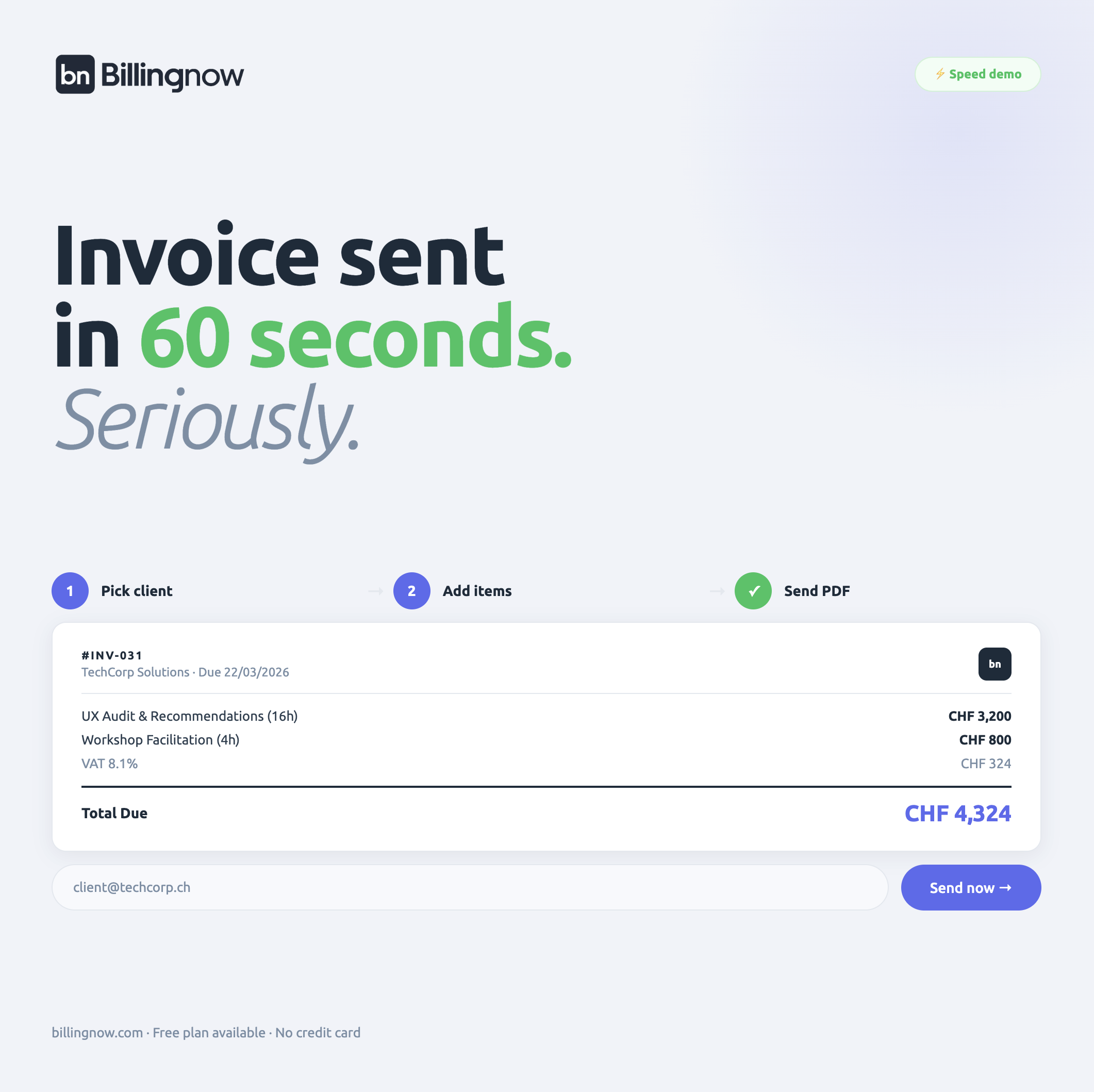
Compared with Invoice2go, the mental load is dramatically lower:
- Fewer tiny decisions every time you bill
- Less chance to forget a line item or tax
- More consistency across clients and projects
The Notion-Style Editor: Why It Matters More Than You Think
If you don't want to go through the AI, there is an alternative…
If you’ve ever used Notion, you know how natural it feels to:
- Type quickly
- Reorder blocks
- Add headings, lists, and tables on the fly
- Mix structure and freeform notes in one place
Now imagine your invoices, quotes, and proposals work like that.
Instead of Invoice2go’s more rigid, form-based layout, a Notion-style editor (like the one used in BillingNow) lets you:
- Start typing like you’re writing on a Word file.
- Turn text into line items, headings, or sections with simple shortcuts
- Add context (project notes, deliverables, timelines) right next to the money details
Why SMBs love this
- Quotes feel like mini-proposalsYou can clearly explain scope, milestones, and expectations without wrestling with clunky text boxes.
- Invoices are easier to understandOrganize work by phase, sprint, or deliverable so clients see exactly what they’re paying for.
Reporting: The Hidden Deal-Breaker for Invoice2go
Many SMBs don’t switch tools because of how invoices look, they switch because of how reports feel.
With Invoice2go, you might have to:
- Open a tax report to see what you owe
- Open an expenses report to see what you’ve spent
- Check invoices to see what’s outstanding
- Look at payments to confirm what’s actually in
That means:
- A lot of report switching
- A higher chance of missing something
- No single, reliable "here’s how you’re doing" view
One table, full picture
Agentic AI tools like BillingNow are rethinking this entirely.
Instead of siloed reports, you get one powerful table that shows:
- Expenses
- Quotes
- Invoices
- Payments
- Taxes
All in one place.
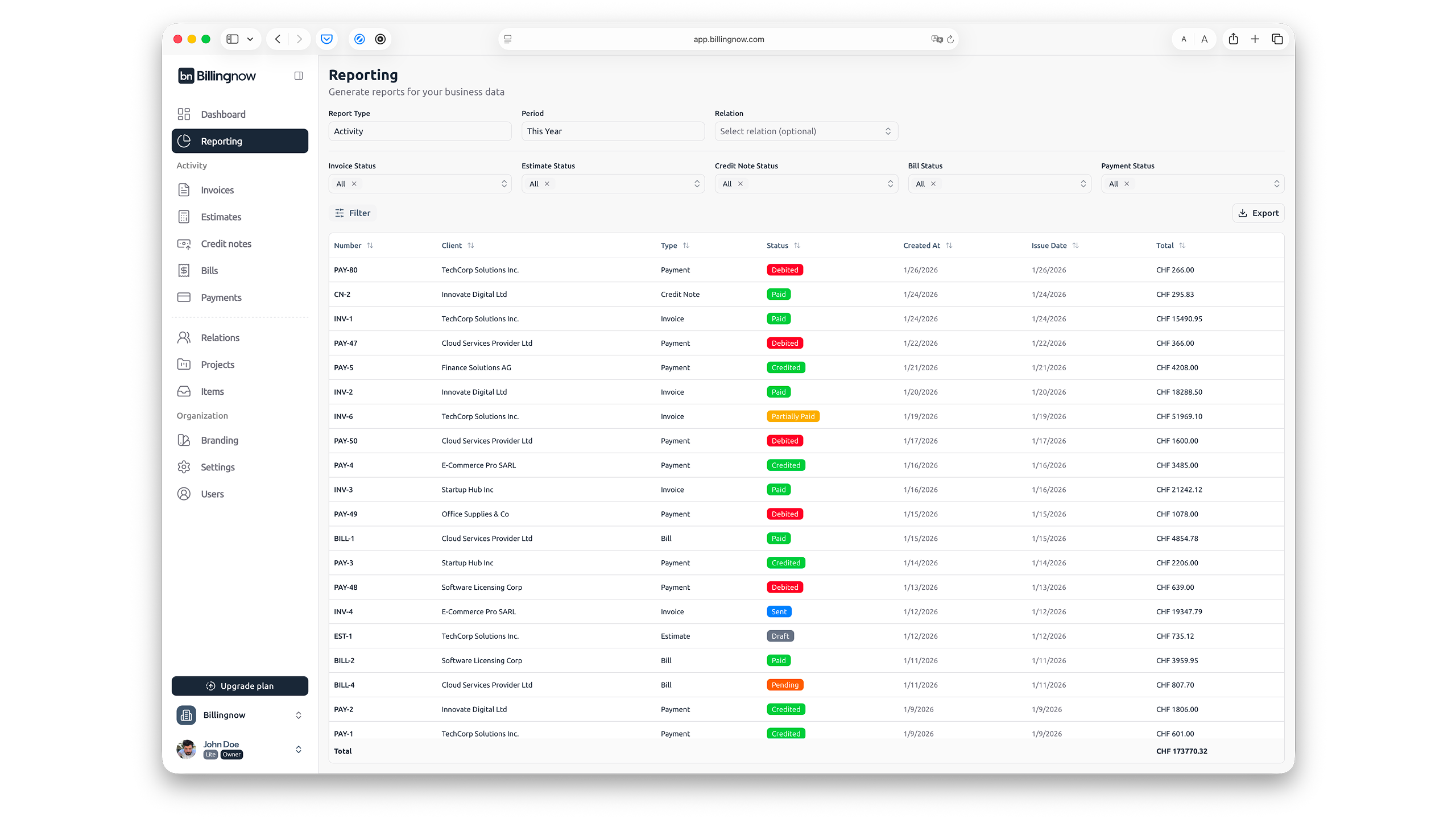
You can:
-
Filter by client, activity type, or time period
-
See at a glance:
- What you earned
- What you spent
- What you owe in taxes
- What’s still outstanding
No more clicking through multiple screens just to answer simple questions like:
- "Can I afford to take next week off?"
- "How much do I actually owe in tax this quarter?"
- "Is this client still profitable after expenses?"
Detailed tax balances, without spreadsheets
Instead of exporting data to a spreadsheet or guessing, detailed tax balance reporting means:
- Your taxable income is calculated automatically
- Relevant tax amounts are summarized in one place
- You can filter by period (month, quarter, year) in one view
Invoice2go can help you collect the information. Agentic AI tools like BillingNow help you actually use it.
Invoice2go vs Agentic AI (Like BillingNow): Key Differences
Let’s line up the experience side by side.
1. Creating invoices
- Invoice2go: Form-based, template-driven. You fill in the blanks.
- Agentic AI (BillingNow): AI drafts invoices based on your past work, habits, and notes. You just review and approve.
2. Editor experience
- Invoice2go: Standard fields, some customization.
- Agentic AI (BillingNow): Notion-style editor where invoices and quotes feel like living documents easy to write, edit, and reuse.
3. Reporting
- Invoice2go: Multiple separate reports for taxes, expenses, and payments.
- Agentic AI (BillingNow): One unified table for all activities (expenses, quotes, invoices, payments) plus detailed, live tax balances.
4. Role of AI
- Invoice2go: Light automation, some helpful shortcuts.
- Agentic AI (BillingNow): The AI is an assistant that acts, drafts, organizes, and proposes complete billing workflows.
What Does Migration Look Like?
Moving away from a familiar tool can feel daunting. In practice, the process is straightforward:
-
Export your data from Invoice2go
- Clients
- Past invoices
- Items/services list (if you use one)
-
Import into your new tool (e.g., BillingNow)
-
Start with a simple testCreate the next invoice or quote using AI assistance. Compare the time spent vs your old Invoice2go process.
Most SMBs find that after one or two billing cycles, they’re comfortable enough to fully switch.
The Future of Freelance Invoicing Is Agentic
In 2016, a good invoicing app let you email a PDF. In 2020, it added online payments. In 2026, the standard is becoming clear:
- AI that does the heavy lifting, not just suggestions
- Editors that feel like Notion, not static forms
- Reporting that shows everything in one place, not scattered screens
If Invoice2go helped you grow into a professional freelancer, an agentic AI platform like BillingNow can help you run your business like a one-person agency with less admin, clearer numbers, and more time for real work.
The best Invoice2go alternative in 2026 isn’t just a different interface. It’s a different mindset: let the system work for you, so you can focus on the creative, strategic, and human parts of your business.